Signaday: A Delicate Handwritten Font for Modern Web Design
As a web designer, I'm always on the lookout for fonts that can add a unique and elegant touch to my projects. Recently, I had the opportunity to test Signaday, a stylish and delicate handwritten font, in a real website layout. Let me share my experience and insights with you.
The Visual Charm of Signaday
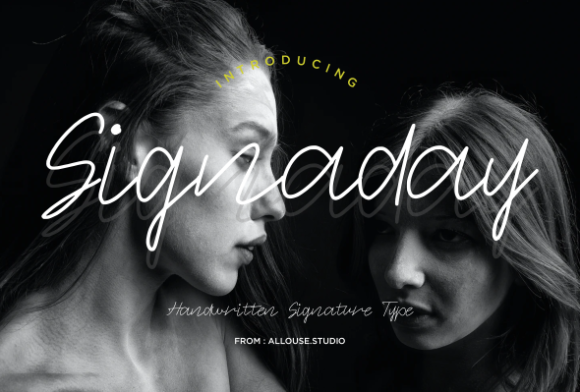
Signaday is a premium font that exudes a clean, thin, and smooth vibe. Its delicate lines and graceful curves make it a standout choice for any design that needs a personal, handcrafted feel. The font's personality is both modern and timeless, making it versatile enough to fit a wide range of digital projects.
Testing Signaday in Real Web Layouts
I decided to test Signaday in a creative portfolio website I was designing. The first thing I noticed was how well it worked in the hero section. The font's elegance and readability made it perfect for a welcoming headline, drawing visitors in with its inviting and sophisticated look.
Next, I experimented with using Signaday in the section headings. The font's distinct style helped to create a clear visual hierarchy, making it easy for users to scan and find the information they needed. The overall effect was a cohesive and professional appearance that enhanced the site's brand identity.
Readability and Responsive Design
One of the key considerations in web design is readability, especially across different devices. I tested Signaday on various screen sizes, from desktop to mobile, and found that it maintained its clarity and charm. For mobile screens, I adjusted the font size and line height to ensure it remained legible and visually appealing.
When using Signaday over image banners, I paid close attention to contrast. The font's thin and smooth lines work best when paired with a solid background or a subtle, non-distracting image. This ensures that the text remains readable and the overall design feels balanced.
Practical Use Cases for Signaday
Signaday is ideal for use in hero titles, section headings, buttons, and short phrases. It adds a touch of elegance and personality to these elements, making them stand out and engage the user. For example, in a boutique online store, Signaday can be used for product category headings, creating a luxurious and inviting shopping experience.
In a coaching website, Signaday can be used for the main call-to-action, such as "Book Your Free Consultation." The font's friendly and approachable style can help to build trust and encourage visitors to take the next step.
Font Pairing and Webfont Availability
To create a well-rounded and professional design, it's important to pair Signaday with a complementary font. I recommend using a simple sans serif font for body copy, such as Arial or Helvetica. This combination provides a good balance between the decorative and the functional, ensuring that the overall design is both beautiful and readable.
Before using Signaday in your web projects, make sure to check the included styles, webfont availability, and file formats. It's also essential to verify multilingual support and commercial font licensing, especially if you plan to use the font on client projects or for an online store.
Limitations and Best Practices
While Signaday is a fantastic choice for many web design elements, it may not be suitable for long body copy, small navigation text, or dense dashboard layouts. The font's decorative nature can make it less readable in these contexts, potentially affecting the user experience.
For the best results, use Signaday for short, impactful text and pair it with a clean, simple font for longer content. This approach will help to maintain a professional and user-friendly design while still benefiting from the font's unique and elegant style.
In conclusion, Signaday is a versatile and charming handwritten font that can elevate the visual appeal and professionalism of your web projects. By following these practical tips and best practices, you can create designs that are both beautiful and functional, enhancing the overall user experience and brand identity.